Have you ever tried editing a video and felt like it was way too hard? Maybe you had lots of Videos clips but didn’t know how to make them look super attractive and super cool.
Well, in 2025, AI-powered video editing tools is here to make it super easy, super fun, and its save your time and days.
So in 2025, AI video editing is not just a fancy popular buzzword—it’s a toolbox you use every day. Whether you’re a solo YouTuber, a Reels superstar on Instagram, or a social media marketer running dozens of campaigns, AIVideo Editing Tools are changing the game Now.
The AI Video Editing Tools like having a super-smart friend who makes editing fun, fast, and totally awesome and Enjoyable.
In this guide, we’ll walk through the biggest AI-powered tools and techniques you need to stay ahead of the curve.
Let’s follow Joey, a fifth-grader, and his best friend Mia as they team up to create the best class video ever about their favorite things—tigers, skateboards, and video games.
Along the way, they discover the top AI video editing tools that make their project a completely Amazing.
Ready to join their adventure and learn the best video editing trends for 2025 ? Let’s get started.
Joey and Mia’s Big Video Adventure
Joey and Mia have a Big school assignment: make a video about something they love. Joey picks tigers because they’re aggressive and frightening, and Mia chooses skateboarding because it’s awesome.
They’ve got lots of clips— tigers running, roaring, and even napping, Mia doing tricks—but editing them feels like solving a very Big puzzle.
Just when they are about to give up, But then Mia says, “Wait, my cousin told me about AI video editors that do the hard work for you and with the help of AI Video Editors we can edits the big video within hours.
Excited, they jump into the world of AI-powered video editing and find 8 Super AI video Editing trends that make their video super attractive. Let’s explore each trends in details.
Trend #1: Magic Auto-Cuts with AI Video Editing Software
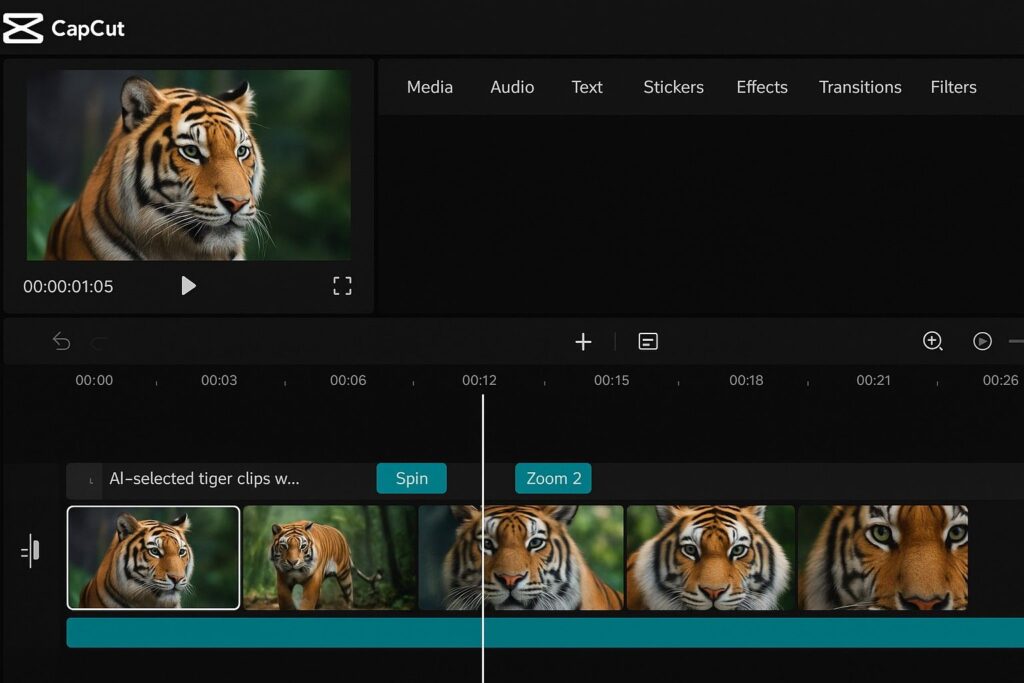
Do you know how Auto-Cuts works in AI Video Editing Software ?
Imagine you’ve got a big part of video clips, like Joey’s tiger roars or Mia’s skate boarding jumps. AI video editing software looks at them and picks the best parts—like the coolest tricks or loudest roars.
It cuts out boring parts, adds smooth transitions (like fading from one clip to another), and even matches music to the action. It’s like having a movie director in your computer!
Why Auto-Cuts in AI Video Editing tools are awesome ?
AI video editing tools for beginners is a game-changer because it saves hours of work. You don’t need to know fancy editing tricks—AI does it all in minutes. It’s perfect for making professional video editing tools look easy, even for kids!
Joey and Mia’s adventure: Joey uploads his tiger clips to CapCut, a free AI video editor. The AI picks the best moments, like a tiger leaping, and adds a dramatic zoom.
Mia uses it for her skateboarding clips, and the AI syncs them to a cool beat. “This is like magic!” Joey shouts. Their video looks like a pro made it by using AI Video Editing Software.
Fun example: Picture making a video of your dog. The AI Video Editing tools picks the moment your Dog follow its tail and adds a funny sound effect. How good is that?
Try it out today ! Download CapCut or try Adobe Premiere Pro’s AI auto-editing features. Can you make a highlight reel of your favorite moments? Best video editing software 2025 like these are waiting for you!
Trend #2: Text-to-Video AI: Turn Your Words into Movies in 2025
What is mean by Text-to-Video AI Editing ?
What if you could type a sentence and watch it turn into a video ? With text-to-video AI, you can achieve this .
Joey types, “A tiger runs through a jungle,” and the AI creates a realistic video clip of it.
Mia types, “A skateboarder does a flip in a city park,” and poof—there’s her clip! This AI video creation tool is like having a movie studio in your pocket.
Why it’s awesome: You don’t need a camera to make awesome videos. Text-to-video AI tools let you create anything you imagine, making your projects super creative.
It’s perfect for AI video editing tools for beginners who want to tell big stories without filming.
Joey and Mia’s adventure: Joey uses Runway ML, a top AI video editing app 2025, to create a jungle scene for his tiger video. The AI Video Editing App ( Runway ML ) makes it look so real that Mia says, “Did you go to Africa?!” Mia adds a city park scene for her skateboarder. “This is next-level AI Tool for Video Editing in 2025!” she happy and cheers.
Fun example: Imagine typing, “A superhero flies over a city,” and seeing it come to life. You could make your own superhero movie!
Try it out! Check out Synthesia or Runway ML to turn your ideas into videos. What crazy scene would you create with AI video generator tools?
Trend #3: Personalized Videos: Make Videos That Know Your Audience
What is mean by Personalized video editing means your video can change based on who’s watching.
Joey adds a quiz to his tiger video that asks, “What do tigers eat?” Viewers pick answers, and the video responds, like saying, “Yup, tigers love meat!”.
Mia makes her skateboarding video say, “Hey, Dhananjay ( Viewer name ) , check this trick!” Interactive video trends 2025 make videos feel like games.
Why it’s awesome: These videos keep people watching because they’re fun and feel special. AI personalized video tools make your audience feel like the star, perfect for school projects or YouTube channels.
Joey and Mia’s adventure: Joey uses Wistia ( Video Hosting Platform ) to add a tiger quiz. His classmates love answering questions during the presentation.
Mia adds a personalized greeting to her video, making each viewer feel special. “It’s like the video knows us!” a classmate says.
Fun example: Picture a video that says, “Happy birthday, Dhananjay !” and shows your favorite game. It’s like a custom present!
Try it out! Explore interactive video editing with Wistia or Eko. Can you make a video that talks to your friends? Try AI video editing apps for fun surprises!
Trend #4: AI Voiceovers and Avatars: Let Robots Talk for You
what is mean by AI Voiceovers and Avatars and How it’s Works ?
Don’t want to record your voice? AI voiceover video tools can read your script in a cool voice—like a cartoon character, a robot, or even a tiger.
You can also add AI-generated avatars, like a virtual teacher or a dancing cat, to present your video. It’s like having actors without hiring anyone!
Why it’s awesome: AI voiceover tools make your videos sound pro without a microphone. Avatars add fun characters, and you can make them speak any language. Perfect for AI video editing tools for kids who want epic narration.
Joey and Mia’s adventure: Joey uses Synthesia to create a virtual tiger that narrates his video in English and Spanish.
Mia makes a skateboarder avatar that explains her tricks. “This tiger talks better than me!” Joey laughs.
Fun example: Imagine a video where your pet cat narrates your day at the park. Or a robot avatar explains your Minecraft build!
Try it out! Try Descript for voiceovers or Synthesia for avatars. What character would you add to your video with AI video editing software 2025?
Trend #5: Chat to Edit: Talk to Your AI Video Editor
What is Chat to Edit in AI Video Editor ?
Natural language video editing lets you tell the AI what to do, like talking to a friend. Joey says, “Cut out the part where I trip at 1 minute,” and the AI fixes it.
Mia says, “Add a slow-motion effect to my skateboard jump,” and it’s done! It’s like the AI understands you perfectly.
Why it’s Super awesome: You don’t need to learn complicated buttons or menus. AI video editing tools for beginners is easier when you can just chat or type. It’s fast and fun, like texting a super-smart editor!
Joey and Mia’s adventure: Joey uses Runway ML to say, “Zoom in on the tiger’s eyes at the end.” The AI does it instantly. Mia tells her tool, “Make my video brighter,” and it shines. “This is easier than texting!” Mia giggles.
Fun example: Imagine saying, “Make my dog’s bark louder,” and the AI does it. You’re the boss of your video!
Try it out! Check out AI video editing apps 2025 like Runway ML for chat-based editing. What would you tell your AI to do?
Trend #6: Crystal Clear Videos: AI Video Enhancement
What is Mean By AI Video Enhancement and How AI Enhance the Video ?
Got a blurry or dark video? AI video enhancement tools can make it sharp, colorful, and clear. They fix shaky footage, brighten colors, and even remove background noise. Your phone videos can look like they were shot by a Hollywood pro!
Why it’s awesome: AI video enhancement makes any video look amazing, even if you filmed it with a cheap camera. It’s like giving your clips a superhero glow-up, perfect for professional video editing.
Joey and Mia’s adventure: Joey’s tiger clips are a bit blurry, but he uses Filmora to sharpen them. The tiger’s fur looks so bright! Mia fixes her shaky skateboarding video, and it’s super smooth. “It’s like my phone’s a movie camera!” Joey says.
Fun example: Picture a dark video of your school play. AI makes it bright and clear, so everyone can see your awesome costume!
Try it out! Use AI video editor free tools like CapCut or Filmora to enhance your videos. Can you make your clips shine?
Trend #7: Smart Music and Sound Effects: AI Picks the Perfect Tunes
Do you know about AI Audio Editing and how it’s works ?
AI audio editing for video picks music and sound effects that match your video’s vibe. Joey’s tiger video gets a dramatic jungle beat, and Mia’s skateboarding clip gets a fast, funky tune.
The AI even adds sound effects, like a “whoosh” for Mia’s jumps or a roar for Joey’s tigers.
Why it’s awesome: Music makes videos way more exciting, but picking the right song is hard. AI video editing software does it for you, saving time and making your video feel like a blockbuster.
It’s great for AI video editing tools for kids who want cool sounds.
Joey and Mia’s adventure: Joey uses Adobe Premiere Pro to add a jungle drumbeat to his tiger video. Mia’s tool picks a hip-hop track for her skateboarding clips. “It’s like my video has its own soundtrack!” Mia says.
Fun example: Imagine a video of you playing soccer. The AI Audio Editing tools adds a crowd cheering sound when you score a goal!
Try it out! Explore AI audio editing tools in CapCut or Adobe Premiere Pro. What song would you add to your video ?
Trend #8: AI Motion Tracking: Follow the Action
Do you know what is mean By AI Motion Tracking ?
AI motion tracking follows moving objects in your video and adds cool effects. Joey wants text that says “Tiger Power!” to follow a running tiger. The AI tracks the tiger and sticks the text to it.
Mia adds a starburst effect that follows her skateboard tricks. It’s like the effects move with the action!
Why it’s awesome: AI Motion tracking makes videos look super professional without hard work. It’s perfect for AI video editing trends 2025 because it adds pizzazz that grabs attention.
Joey and Mia’s adventure: Joey uses Runway ML to add “Tiger Power!” text that zooms with his tiger. Mia adds sparkles to her skateboard flips. “It’s like my tricks are sparkling!” she says.
Fun example: Imagine a video of your bike ride. AI adds a “Zoom!” graphic that follows you down a hill. So cool, right ?
Try it out! Try these AI motion tracking tools in Runway ML or After Effects. What effect would you add to your video?
Joey and Mia’s Big Win
Joey and Mia finish their video, and it’s a total hit! Their classmates cheer, and their teacher gives them high-fives.
Joey’s tigers roar with epic effects, and Mia’s skateboarding tricks shine with cool music and sparkles.
“AI video editing tools made this so easy!” Joey says. Mia nods, “And way more fun than I thought!” They’re already planning their next video about video games.
Why These Trends Are the Future
AI-powered video editing is changing the game in 2025. Tools like AI video editor free options make it easy for anyone—even fifth-graders—to create awesome videos with the Help of AI Video Editing tools. Here’s why these trends are so cool:
- Save time: AI Tools does the hard stuff, like cutting clips or picking music.
- Spark creativity: Text-to-video Editing and avatars let you dream big.
- Look pro: Enhanced videos and motion tracking make your work shine.
- Fun for everyone: AI video editing tools for kids means no experience needed!
How to Get Started with AI Video Editing
Ready to make your own very long and exciting AI video in 2025 ? Here’s how to jump in:
- Pick a tool: Try free AI video editors like CapCut or Clipchamp. Many have kid-friendly interfaces!
- Start simple: Upload a short clip, like your pet or a school event, and try auto-cuts or enhancements.
- Get creative: Use text-to-video or voiceovers to add your own style.
- Share it: Post your video on YouTube, TikTok, or show it to your class!
Fun Quiz: Which AI Tool Is Your Superpower?
Want to know which AI video editing tool matches your style? Take this quick quiz!
- What kind of video do you want to make?
- A) Action-packed (like sports or animals) → Try CapCut for auto-cuts!
- B) Imaginative (like sci-fi or fantasy) → Try Runway ML for text-to-video!
- C) Funny (like skits or memes) → Try Synthesia for avatars!
- What’s most important to you?
- A) Easy editing → Natural language video editing tools.
- B) Cool effects → AI motion tracking tools.
- C) Awesome sound → AI audio editing tools.
Share your results with friends and start editing today.
Real-World Examples: Kids Like You Using AI
Kids all over are using AI video editing apps to create amazing stuff in 2025 :
- Sophie, age 10: Made a video about her cat using CapCut. The AI Tools added funny sound effects, and it got 100 likes on TikTok!
- Liam, age 11: Used Runway ML to create a sci-fi video from text. His class thought it was a real movie!
- Emma, age 9: Added an AI voiceover to her school project with Descript. Her teacher loved the pro sound!
What will you create with AI video editing software 2025?
Tips for Making Your Videos Stand Out
Want your videos to be the talk of the school? Try these:
- Tell a story: Start with something exciting, like Joey’s tiger roar or Mia’s big jump.
- Keep it short: Aim for 1–3 minutes so viewers stay hooked.
- Add your personality: Use AI voiceover tools or avatars to show your style.
- Test and tweak: Try different effects and ask friends what they like.
The Future of AI Video Editing
In 2025, AI video editing trends are just getting started. Experts say we’ll see even cooler stuff, like:
- Virtual reality videos: Edit videos you can step inside with AI!
- Smarter AI helpers: Tools that suggest ideas based on your clips.
- Eco-friendly editing: AI that uses less energy to edit, helping the planet.
What do you think the next big trend will be? Maybe an AI that edits videos just by thinking about them!
Conclusion – Your Turn to Shine
Joey and Mia learned that AI-powered video editing is like having a superpower. Whether you’re making a video for school, fun, or to share online, these video editing trends 2025 make it easy and awesome.
So take a AI tools like CapCut, Runway ML, or Synthesia and start creating today! What story will you tell? Isn’t it time to make your own blockbuster?
Fun challenge: Make a 1-minute video about your favorite hobby using one of these tools. Share it with your friends or family and see what they think!